Virtual Kubelet Mesh Networking Documentation
Overview
The mesh networking feature enables full network connectivity between Virtual Kubelet pods and the Kubernetes cluster using a combination of WireGuard VPN and wstunnel (WebSocket tunneling). This allows pods running on remote compute resources (e.g., HPC clusters via SLURM) to seamlessly communicate with services and pods in the main Kubernetes cluster.
High-Level Architecture Diagram
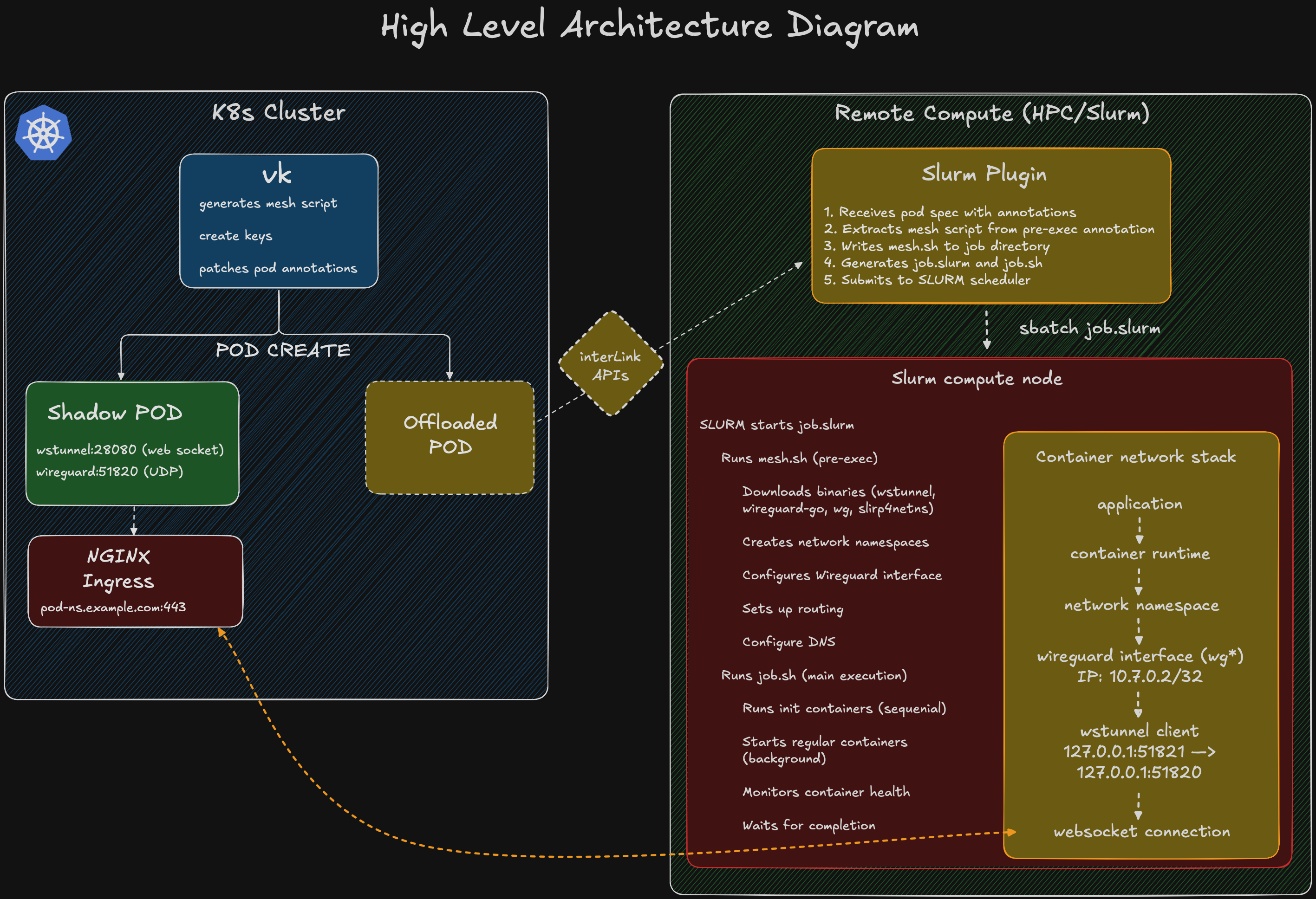
Network Traffic Flow Example:
═════════════════════════════

Pod on HPC wants to access service "mysql.default.svc.cluster.local:3306"

1. Application makes request to mysql.default.svc.cluster.local:3306
   └─▶ DNS resolution via 10.244.0.99
       └─▶ Resolves to service IP (e.g., 10.105.123.45)

2. Traffic is routed to WireGuard interface (matches 10.105.0.0/16)
   └─▶ Packet: [Src: 10.7.0.2] [Dst: 10.105.123.45:3306]

3. WireGuard encrypts and encapsulates packet
   └─▶ Sends to peer 10.7.0.1 via endpoint 127.0.0.1:51821

4. wstunnel client receives UDP packet on 127.0.0.1:51821
   └─▶ Forwards to local WireGuard on 127.0.0.1:51820

5. wstunnel encapsulates in WebSocket frame
   └─▶ Sends over WSS connection to pod-ns.example.com:443

6. Ingress controller receives WSS connection
   └─▶ Routes to wstunnel server pod service

7. wstunnel server receives WebSocket frame
   └─▶ Extracts UDP packet
   └─▶ Forwards to local WireGuard on 127.0.0.1:51820

8. WireGuard server (10.7.0.1) decrypts packet
   └─▶ Routes to destination: 10.105.123.45:3306

9. Kubernetes service forwards to MySQL pod endpoint

10. Return traffic follows reverse path
Mesh Overlay Network Topology
This diagram shows how the WireGuard overlay network (10.7.0.0/24) creates a virtual mesh connecting remote HPC pods to the Kubernetes cluster network:
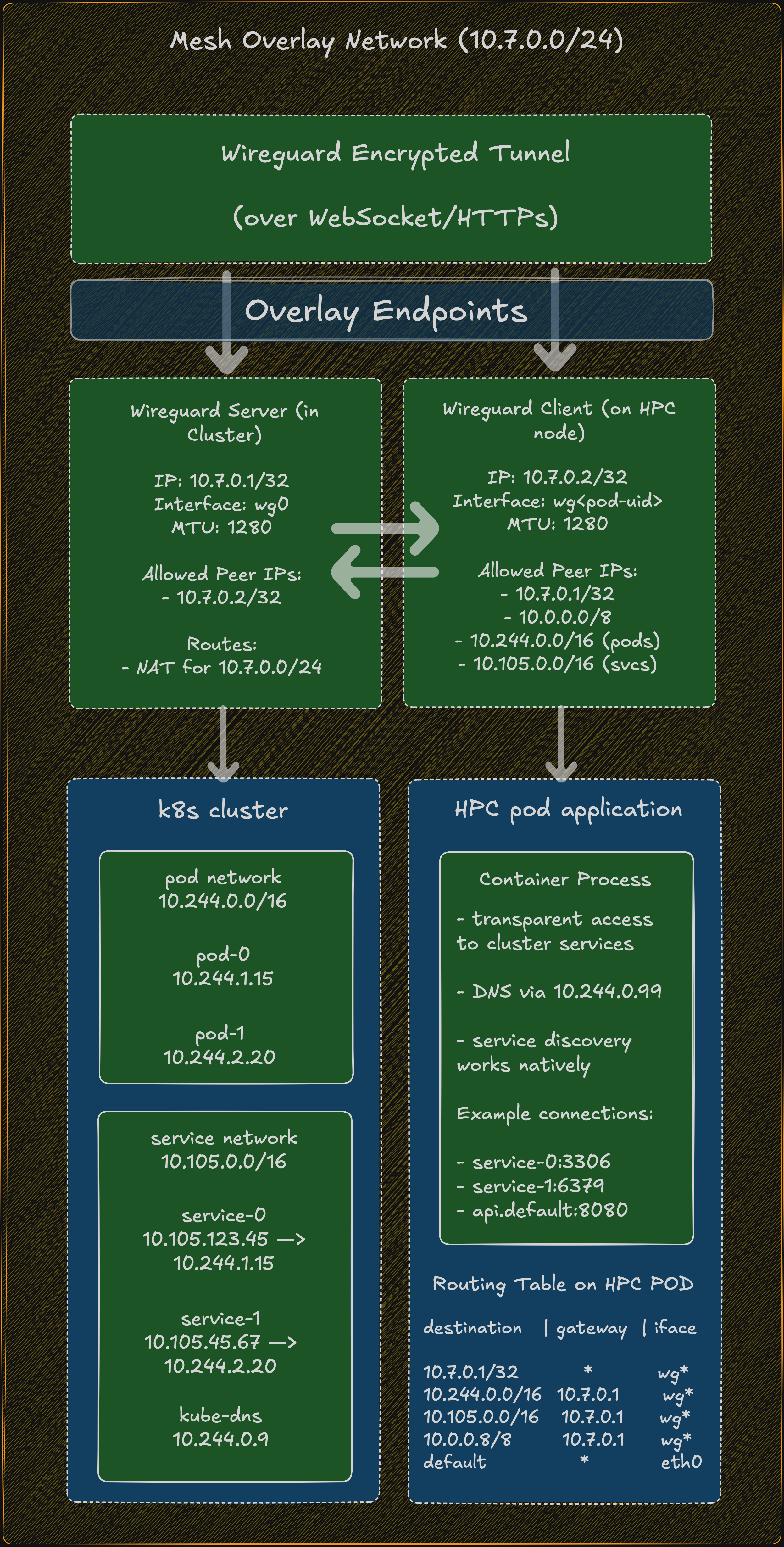
PACKET FLOW EXAMPLE: HPC Pod → MySQL Service
═════════════════════════════════════════════

Step 1: DNS Resolution
──────────────────────
HPC Pod: "What is mysql.default.svc.cluster.local?"
    │
    └──▶ Query sent to 10.244.0.99 (kube-dns)
         │
         ├─▶ Routed via wg* interface (matches 10.244.0.0/16)
         │
         ├─▶ Encrypted by WireGuard client (10.7.0.2)
         │
         ├─▶ Sent via wstunnel → Ingress → wstunnel server
         │
         ├─▶ Decrypted by WireGuard server (10.7.0.1)
         │
         └─▶ Reaches kube-dns pod at 10.244.0.99
             │
             └─▶ Response: 10.105.123.45 (mysql service ClusterIP)


Step 2: TCP Connection to Service
──────────────────────────────────
HPC Pod: TCP SYN to 10.105.123.45:3306
    │
    ├─▶ Packet: [Src: 10.7.0.2:random] [Dst: 10.105.123.45:3306]
    │
    ├─▶ Routing decision: matches 10.105.0.0/16 → via wg* interface
    │
    ├─▶ WireGuard client encrypts packet
    │   │
    │   └─▶ Encrypted packet: [Src: 10.7.0.2] [Dst: 10.7.0.1]
    │
    ├─▶ wstunnel client on HPC (127.0.0.1:51821)
    │   │
    │   └─▶ Forwards to WireGuard (127.0.0.1:51820)
    │
    ├─▶ Encapsulated in WebSocket frame
    │   │
    │   └─▶ WSS connection: HPC → pod-ns.example.com:443
    │
    ├─▶ Ingress controller routes to wstunnel server service
    │
    ├─▶ wstunnel server (in cluster) extracts WebSocket payload
    │   │
    │   └─▶ Forwards UDP to local WireGuard (127.0.0.1:51820)
    │
    ├─▶ WireGuard server (10.7.0.1) decrypts packet
    │   │
    │   └─▶ Original packet: [Src: 10.7.0.2:random] [Dst: 10.105.123.45:3306]
    │
    ├─▶ Kernel routing: 10.105.123.45 is a service IP
    │   │
    │   └─▶ kube-proxy/iptables/IPVS handles service load balancing
    │
    └─▶ Traffic reaches MySQL pod at 10.244.1.15:3306


Step 3: Return Path
───────────────────
MySQL Pod: TCP SYN-ACK from 10.244.1.15:3306
    │
    ├─▶ Packet: [Src: 10.244.1.15:3306] [Dst: 10.7.0.2:random]
    │
    ├─▶ Routing: destination is in WireGuard network
    │
    ├─▶ WireGuard server encrypts and sends to peer 10.7.0.2
    │
    ├─▶ Reverse path through wstunnel
    │
    └─▶ Arrives at HPC pod: [Src: 10.105.123.45:3306] [Dst: 10.7.0.2:random]
        │
        └─▶ Application receives response

KEY CHARACTERISTICS OF THE MESH OVERLAY
════════════════════════════════════════

1. Point-to-Point Tunnels
   • Each HPC pod has a dedicated tunnel to the cluster
   • Not a true "mesh" between HPC pods (they don't directly communicate)
   • But appears as a "mesh" from cluster perspective

2. Consistent Addressing
   • Server side: Always 10.7.0.1/32
   • Client side: Always 10.7.0.2/32
   • Isolated per tunnel (no IP conflicts)

3. Network Isolation
   • Each pod runs in its own network namespace
   • WireGuard interface unique per pod (wg<pod-uid-prefix>)
   • No cross-pod interference

4. Transparent Cluster Access
   • HPC pods use standard Kubernetes service DNS names
   • No special configuration in application code
   • Native service discovery works

5. Scalability
   • Independent tunnels scale linearly
   • No coordination needed between HPC pods
   • Server resources scale with pod count
Architecture
Components
- WireGuard VPN: Provides encrypted peer-to-peer network tunnel
- wstunnel: WebSocket tunnel that encapsulates WireGuard traffic, allowing it to traverse firewalls and NAT
- slirp4netns: User-mode networking for unprivileged containers
- Network Namespace Management: Provides network isolation and routing
Network Flow
Remote Pod (Client) <-> WireGuard Client <-> wstunnel Client <-> wstunnel Server <-> WireGuard Server <-> K8s Cluster Network
Detailed Flow:
- Remote pod initiates connection
- Traffic is routed through WireGuard interface (
wg*) - WireGuard encrypts and encapsulates traffic
- wstunnel client forwards encrypted WireGuard packets via WebSocket to the ingress endpoint
- wstunnel server in the cluster receives WebSocket traffic
- WireGuard server decrypts and routes traffic to cluster services/pods
- Return traffic follows the reverse path
Configuration
Enabling Full Mesh Mode
In your Virtual Kubelet configuration or Helm values:
virtualNode:
  network:
    # Enable full mesh networking
    fullMesh: true

    # Kubernetes cluster network ranges
    serviceCIDR: "10.105.0.0/16"      # Service CIDR range
    podCIDRCluster: "10.244.0.0/16"   # Pod CIDR range

    # DNS configuration
    dnsService: "10.244.0.99"         # IP of kube-dns service

    # Optional: Custom binary URLs
    wireguardGoURL: "https://github.com/interlink-hq/interlink-artifacts/raw/main/wireguard-go/v0.0.20201118/linux-amd64/wireguard-go"
    wgToolURL: "https://github.com/interlink-hq/interlink-artifacts/raw/main/wgtools/v1.0.20210914/linux-amd64/wg"
    wstunnelExecutableURL: "https://github.com/interlink-hq/interlink-artifacts/raw/main/wstunnel/v10.4.4/linux-amd64/wstunnel"
    slirp4netnsURL: "https://github.com/interlink-hq/interlink-artifacts/raw/main/slirp4netns/v1.2.3/linux-amd64/slirp4netns"

    # Unshare mode for network namespaces
    unshareMode: "auto"  # Options: "auto", "none", "user"

    # Custom mesh script template path (optional)
    meshScriptTemplatePath: "/path/to/custom/mesh.sh"
Configuration Options
Network CIDRs
-
serviceCIDR: CIDR range for Kubernetes services- Default:
10.105.0.0/16 - Used to route service traffic through the VPN
- Default:
-
podCIDRCluster: CIDR range for Kubernetes pods- Default:
10.244.0.0/16 - Used to route inter-pod traffic through the VPN
- Default:
-
dnsService: IP address of the cluster DNS service- Default:
10.244.0.99 - Typically the kube-dns or CoreDNS service IP
- Default:
Binary URLs
Default URLs point to pre-built binaries in the interlink-artifacts repository. You can override these to use your own hosted binaries or different versions.
Unshare Mode
Controls how network namespaces are created:
auto(default): Automatically detects the best methodnone: No namespace isolation (may be needed for certain HPC environments)user: Uses user namespaces (requires kernel support)
How It Works
1. WireGuard Key Generation
When a pod is created, the system generates:
- A WireGuard private/public key pair for the client (remote pod)
- The server's public key is derived from its private key
Keys are generated using X25519 curve cryptography:
func generateWGKeypair() (string, string, error) {
    privRaw := make([]byte, 32)
    rand.Read(privRaw)

    // Clamp private key per RFC 7748
    privRaw[0] &= 248
    privRaw[31] &= 127
    privRaw[31] |= 64

    pubRaw, _ := curve25519.X25519(privRaw, curve25519.Basepoint)
    return base64Encode(privRaw), base64Encode(pubRaw), nil
}
2. Pre-Exec Script Generation
The system generates a bash script that is executed before the main pod application starts. This script:
-
Downloads necessary binaries:
wstunnel- WebSocket tunnel clientwireguard-go- Userspace WireGuard implementationwg- WireGuard configuration toolslirp4netns- User-mode networking (if needed)
-
Sets up network namespace:
- Creates isolated network environment
- Configures routing tables
- Sets up DNS resolution
-
Configures WireGuard interface:
- Creates interface (named
wg<pod-uid-prefix>) - Applies configuration with keys and allowed IPs
- Sets MTU (default: 1280 bytes)
- Creates interface (named
-
Establishes wstunnel connection:
- Connects to ingress endpoint via WebSocket
- Forwards WireGuard traffic through the tunnel
- Uses password-based authentication
-
Configures routing:
- Routes cluster service CIDR through VPN
- Routes cluster pod CIDR through VPN
- Sets DNS to cluster DNS service
3. Annotations Added to Pod
The system adds several annotations to the pod:
annotations:
  # Pre-execution script that sets up the mesh
  slurm-job.vk.io/pre-exec: "<generated-mesh-script>"

  # WireGuard client configuration snippet
  interlink.eu/wireguard-client-snippet: |
    [Interface]
    Address = 10.7.0.2/32
    PrivateKey = <CLIENT_PRIVATE_KEY>
    DNS = 1.1.1.1
    MTU = 1280

    [Peer]
    PublicKey = <SERVER_PUBLIC_KEY>
    AllowedIPs = 10.7.0.1/32, 10.0.0.0/8
    Endpoint = 127.0.0.1:51821
    PersistentKeepalive = 25
4. Server-Side Resources
For each pod, the system creates (or can create) server-side resources in the cluster:
- Deployment: Runs wstunnel server and WireGuard server containers
- ConfigMap: Contains WireGuard server configuration
- Service: Exposes wstunnel endpoint
- Ingress: Provides external access via DNS (e.g.,
podname-namespace.example.com)
Network Address Allocation
IP Addressing Scheme
- WireGuard Overlay Network:
10.7.0.0/24- Server (cluster side):
10.7.0.1/32 - Client (remote pod):
10.7.0.2/32
- Server (cluster side):
Allowed IPs Configuration
Client side allows traffic to:
10.7.0.1/32- WireGuard server10.0.0.0/8- General overlay range<serviceCIDR>- Kubernetes services<podCIDRCluster>- Kubernetes pods
Server side allows traffic from:
10.7.0.2/32- WireGuard client
DNS Name Sanitization
The system ensures all generated resource names comply with RFC 1123 DNS naming requirements:
Rules Applied:
- Convert to lowercase
- Replace invalid characters with hyphens
- Remove leading/trailing hyphens
- Collapse consecutive hyphens
- Truncate to 63 characters (max label length)
- Truncate full DNS names to 253 characters
Example:
Input:  "My_Pod.Name@123"
Output: "my-pod-name-123"
Template Customization
Mesh Script Template Structure
The mesh script template is a Go template that generates a bash script. The default template is embedded in the Virtual Kubelet binary but can be overridden with a custom template.
Default Template Location
- Embedded:
templates/mesh.sh(in the VK binary) - Custom: Specified via
meshScriptTemplatePathconfiguration
Template Loading Priority
-
Custom Template (if
meshScriptTemplatePathis set):if p.config.Network.MeshScriptTemplatePath != "" {
content, err := os.ReadFile(p.config.Network.MeshScriptTemplatePath)
// Use custom template
} -
Embedded Template (fallback):
tmplContent, err := meshScriptTemplate.ReadFile("templates/mesh.sh")
// Use embedded template
Using Custom Mesh Script Template
You can provide a custom template for the mesh setup script:
virtualNode:
  network:
    meshScriptTemplatePath: "/etc/custom/mesh-template.sh"
The custom template file should be mounted into the Virtual Kubelet container:
extraVolumes:
  - name: mesh-template
    configMap:
      name: custom-mesh-template

extraVolumeMounts:
  - name: mesh-template
    mountPath: /etc/custom
    readOnly: true
Template Variables
The mesh script template receives the following data structure:
type MeshScriptTemplateData struct {
    WGInterfaceName       string  // WireGuard interface name (e.g., "wg5f3b9c2d3a4e")
    WSTunnelExecutableURL string  // URL to download wstunnel binary
    WireguardGoURL        string  // URL to download wireguard-go binary
    WgToolURL             string  // URL to download wg tool
    Slirp4netnsURL        string  // URL to download slirp4netns
    WGConfig              string  // Complete WireGuard configuration
    DNSServiceIP          string  // Cluster DNS service IP (e.g., "10.244.0.99")
    RandomPassword        string  // Authentication password for wstunnel
    IngressEndpoint       string  // wstunnel server endpoint (e.g., "pod-ns.example.com")
    WGMTU                 int     // MTU for WireGuard interface (default: 1280)
    PodCIDRCluster        string  // Cluster pod CIDR (e.g., "10.244.0.0/16")
    ServiceCIDR           string  // Cluster service CIDR (e.g., "10.105.0.0/16")
    UnshareMode           string  // Namespace creation mode ("auto", "none", "user")
}
Template Variable Usage Examples
# Access variables in template using Go template syntax
{{.WGInterfaceName}}           # => "wg5f3b9c2d3a4e"
{{.WSTunnelExecutableURL}}     # => "https://github.com/.../wstunnel"
{{.DNSServiceIP}}              # => "10.244.0.99"
{{.WGMTU}}                     # => 1280
{{.IngressEndpoint}}           # => "pod-namespace.example.com"
WireGuard Configuration Variable
The {{.WGConfig}} variable contains a complete WireGuard configuration:
[Interface]
PrivateKey = <client-private-key>

[Peer]
PublicKey = <server-public-key>
AllowedIPs = 10.7.0.1/32,10.0.0.0/8,10.244.0.0/16,10.105.0.0/16
Endpoint = 127.0.0.1:51821
PersistentKeepalive = 25
Example Default Custom Template
Here's the default mesh script template used by Virtual Kubelet:
#!/bin/bash
set -e
set -m

export PATH=$PATH:$PWD:/usr/sbin:/sbin

# Prepare the temporary directory
TMPDIR=${SLIRP_TMPDIR:-/tmp/.slirp.$RANDOM$RANDOM}
mkdir -p $TMPDIR
cd $TMPDIR

# Set WireGuard interface name
WG_IFACE="{{.WGInterfaceName}}"

echo "=== Downloading binaries (outside namespace) ==="

# Download wstunnel
echo "Downloading wstunnel..."
if ! curl -L -f -k {{.WSTunnelExecutableURL}} -o wstunnel; then
    echo "ERROR: Failed to download wstunnel"
    exit 1
fi
chmod +x wstunnel

# Download wireguard-go
echo "Downloading wireguard-go..."
if ! curl -L -f -k {{.WireguardGoURL}} -o wireguard-go; then
    echo "ERROR: Failed to download wireguard-go"
    exit 1
fi
chmod +x wireguard-go

# Download and build wg tool
echo "Downloading wg tool..."
if ! curl -L -f -k {{.WgToolURL}} -o wg; then
    echo "ERROR: Failed to download wg tools"
    exit 1
fi
chmod +x wg

# Download slirp4netns
echo "Downloading slirp4netns..."
if ! curl -L -f -k {{.Slirp4netnsURL}} -o slirp4netns; then
    echo "ERROR: Failed to download slirp4netns"
    exit 1
fi
chmod +x slirp4netns

# Check if iproute2 is available
if ! command -v ip &> /dev/null; then
    echo "ERROR: 'ip' command not found. Please install iproute2 package"
    exit 1
fi

# Copy ip command to tmpdir for use in namespace
IP_CMD=$(command -v ip)
cp $IP_CMD $TMPDIR/ || echo "Warning: could not copy ip command"

echo "=== All binaries downloaded successfully ==="

# Create WireGuard config with dynamic interface name
cat <<'EOFWG' > $WG_IFACE.conf
{{.WGConfig}}
EOFWG

# Generate the execution script that will run inside the namespace
cat <<'EOFSLIRP' > $TMPDIR/slirp.sh
#!/bin/bash
set -e

# Ensure PATH includes tmpdir
export PATH=$TMPDIR:$PATH:/usr/sbin:/sbin

# Get WireGuard interface name from parent
WG_IFACE="{{.WGInterfaceName}}"

echo "=== Inside network namespace ==="
echo "Using WireGuard interface: $WG_IFACE"

export WG_SOCKET_DIR="$TMPDIR"

# Override /etc/resolv.conf to avoid issues with read-only filesystems
# Not all environments support this; ignore errors
set -euo pipefail

HOST_DNS=$(grep "^nameserver" /etc/resolv.conf | head -1 | awk '{print $2}')

{
  mkdir -p /tmp/etc-override
  echo "search default.svc.cluster.local svc.cluster.local cluster.local" > /tmp/etc-override/resolv.conf
  echo "nameserver $HOST_DNS" >> /tmp/etc-override/resolv.conf
  echo "nameserver {{.DNSServiceIP}}" >> /tmp/etc-override/resolv.conf
  echo "nameserver 1.1.1.1" >> /tmp/etc-override/resolv.conf
  echo "nameserver 8.8.8.8" >> /tmp/etc-override/resolv.conf
  mount --bind /tmp/etc-override/resolv.conf /etc/resolv.conf
} || {
  rc=$?
  echo "ERROR: one of the commands failed (exit $rc)" >&2
  exit $rc
}

# Make filesystem private to allow bind mounts
mount --make-rprivate / 2>/dev/null || true

# Create writable /var/run with wireguard subdirectory
mkdir -p $TMPDIR/var-run/wireguard
mount --bind $TMPDIR/var-run /var/run

cat > $TMPDIR/resolv.conf <<EOF
search default.svc.cluster.local svc.cluster.local cluster.local
nameserver {{.DNSServiceIP}}
nameserver 1.1.1.1
EOF
export LOCALDOMAIN=$TMPDIR/resolv.conf


# Start wstunnel in background
echo "Starting wstunnel..."
cd $TMPDIR
./wstunnel client -L 'udp://127.0.0.1:51821:127.0.0.1:51820?timeout_sec=0' --http-upgrade-path-prefix {{.RandomPassword}} ws://{{.IngressEndpoint}}:80 &
WSTUNNEL_PID=$!

# Give wstunnel time to establish connection
sleep 3

# Start WireGuard
echo "Starting WireGuard on interface $WG_IFACE..."
WG_I_PREFER_BUGGY_USERSPACE_TO_POLISHED_KMOD=1 WG_SOCKET_DIR=$TMPDIR  ./wireguard-go $WG_IFACE &
WG_PID=$!

# Give WireGuard time to create interface
sleep 2

# Configure WireGuard interface
echo "Configuring WireGuard interface $WG_IFACE..."
ip link set $WG_IFACE up
ip addr add 10.7.0.2/32 dev $WG_IFACE
./wg setconf $WG_IFACE $WG_IFACE.conf
ip link set dev $WG_IFACE mtu {{.WGMTU}}

# Add routes for pod and service CIDRs
echo "Adding routes..."
ip route add 10.7.0.0/16 dev $WG_IFACE || true
ip route add 10.96.0.0/16 dev $WG_IFACE || true
ip route add {{.PodCIDRCluster}} dev $WG_IFACE || true
ip route add {{.ServiceCIDR}} dev $WG_IFACE || true

echo "=== Full mesh network configured successfully ==="
echo "Testing connectivity..."
ping -c 1 -W 2 10.7.0.1 || echo "Warning: Cannot ping WireGuard server"

# Execute the original command passed as arguments
$@
EOFSLIRP

chmod +x $TMPDIR/slirp.sh

echo "=== Starting network namespace ==="

# Detect best unshare strategy for this environment
# Priority: 1) Config file setting, 2) Environment variable, 3) Default (auto)
# Valid values: auto, map-root, map-user, none
CONFIG_UNSHARE_MODE="{{.UnshareMode}}"
UNSHARE_MODE="${SLIRP_USERNS_MODE:-$CONFIG_UNSHARE_MODE}"
UNSHARE_FLAGS=""

echo "Unshare mode from config: $CONFIG_UNSHARE_MODE"
echo "Active unshare mode: $UNSHARE_MODE"

case "$UNSHARE_MODE" in
    "none")
        echo "User namespace disabled (mode=none)"
        echo "WARNING: Running without user namespace. Some operations may fail."
        UNSHARE_FLAGS=""
        ;;

    "map-root")
        echo "Using --map-root-user mode (mode=map-root)"
        UNSHARE_FLAGS="--user --map-root-user"
        ;;

    "map-user")
        echo "Using --map-user/--map-group mode (mode=map-user)"
        UNSHARE_FLAGS="--user --map-user=$(id -u) --map-group=$(id -g)"
        ;;

    "auto"|*)
        echo "Auto-detecting user namespace configuration (mode=auto)"

        # Check if user namespaces are allowed
        if [ -e /proc/sys/kernel/unprivileged_userns_clone ]; then
            USERNS_ALLOWED=$(cat /proc/sys/kernel/unprivileged_userns_clone 2>/dev/null || echo "1")
        else
            USERNS_ALLOWED="1"  # Assume allowed if file doesn't exist
        fi

        if [ "$USERNS_ALLOWED" != "1" ]; then
            echo "User namespaces are disabled on this system"
            UNSHARE_FLAGS=""
        else
            # Check for newuidmap/newgidmap and subuid/subgid support
            if command -v newuidmap &> /dev/null && command -v newgidmap &> /dev/null && [ -f /etc/subuid ] && [ -f /etc/subgid ]; then
                SUBUID_START=$(grep "^$(id -un):" /etc/subuid 2>/dev/null | cut -d: -f2)
                SUBUID_COUNT=$(grep "^$(id -un):" /etc/subuid 2>/dev/null | cut -d: -f3)

                if [ -n "$SUBUID_START" ] && [ -n "$SUBUID_COUNT" ] && [ "$SUBUID_COUNT" -gt 0 ]; then
                    echo "Using user namespace with UID/GID mapping (subuid available)"
                    UNSHARE_FLAGS="--user --map-user=$(id -u) --map-group=$(id -g)"
                else
                    echo "Using user namespace with root mapping (no subuid)"
                    UNSHARE_FLAGS="--user --map-root-user"
                fi
            else
                echo "Using user namespace with root mapping (no newuidmap/newgidmap)"
                UNSHARE_FLAGS="--user --map-root-user"
            fi
        fi
        ;;
esac

echo "Unshare flags: $UNSHARE_FLAGS"

# Execute the script within unshare
unshare $UNSHARE_FLAGS --net --mount $TMPDIR/slirp.sh "$@" &
sleep 0.1
JOBPID=$!
echo "$JOBPID" > /tmp/slirp_jobpid

# Wait for the job pid to be established
sleep 1

# Create the tap0 device with slirp4netns
echo "Starting slirp4netns..."
./slirp4netns --api-socket /tmp/slirp4netns_$JOBPID.sock --configure --mtu=65520 --disable-host-loopback $JOBPID tap0 &
SLIRPPID=$!

# Wait a bit for slirp4netns to be ready
sleep 5

# Bring the main job to foreground and wait for completion
echo "=== Bringing job to foreground ==="
fg 1
Template Best Practices
- Error Handling: Always use
set -eto exit on errors - Logging: Print informative messages for each step
- Binary Validation: Check download success of binaries
- Connectivity Tests: Verify WireGuard connection before continuing
- Cleanup: Handle cleanup in trap handlers if needed
- Timeouts: Add appropriate timeout values
- Conditional Logic: Use Go template conditionals for different modes
Heredoc Format
The Virtual Kubelet wraps the generated script in a heredoc for transmission:
cat <<'EOFMESH' > $TMPDIR/mesh.sh
<generated-script-content>
EOFMESH
chmod +x $TMPDIR/mesh.sh
$TMPDIR/mesh.sh
This heredoc is then:
- Extracted by the SLURM plugin
- Written to a separate
mesh.shfile - Executed before the main job script
Advanced Customization Examples
Adding Custom DNS Configuration
# In your custom template
{{if .DNSServiceIP}}
echo "Configuring DNS..."
echo "nameserver {{.DNSServiceIP}}" > /etc/resolv.conf
echo "search default.svc.cluster.local svc.cluster.local cluster.local" >> /etc/resolv.conf
{{end}}
Custom MTU Detection
# Auto-detect optimal MTU
echo "Detecting optimal MTU..."
BASE_MTU=$(ip route get {{.IngressEndpoint}} | grep -oP 'mtu \K[0-9]+' || echo 1500)
WG_MTU=$((BASE_MTU - 80))  # Account for WireGuard overhead
echo "Using MTU: $WG_MTU"
ip link set {{.WGInterfaceName}} mtu $WG_MTU
Environment-Specific Binary Downloads
{{if eq .UnshareMode "none"}}
# HPC environment - binaries might be pre-installed
if [ -f "/opt/wireguard/wg" ]; then
    echo "Using pre-installed WireGuard"
    ln -s /opt/wireguard/wg ./wg
else
    wget -q {{.WgToolURL}} -O wg
    chmod +x wg
fi
{{end}}
Security Considerations
Encryption
- All traffic is encrypted using WireGuard's ChaCha20-Poly1305 cipher
- Keys are generated using secure random number generation
- Private keys are never transmitted; only public keys are exchanged
Authentication
- wstunnel uses password-based path prefix authentication
- Each pod gets a unique random password
- Prevents unauthorized access to the tunnel
Network Isolation
- WireGuard operates in a separate network namespace
- Only allowed IPs can traverse the VPN
- Server-side firewall rules restrict WireGuard port access
Troubleshooting
Common Issues
1. Pod Cannot Reach Cluster Services
Symptoms: Pod starts but cannot connect to Kubernetes services
Checks:
- Verify
serviceCIDRmatches your cluster configuration - Check if WireGuard interface is up:
ip addr show wg* - Verify routing:
ip route show - Test WireGuard peer connectivity:
ping 10.7.0.1
2. WireGuard Connection Fails
Symptoms: WireGuard interface doesn't come up
Checks:
- Ensure binaries are accessible from the configured URLs
- Check if wstunnel server is reachable
- Verify ingress endpoint DNS resolution
- Review pre-exec script logs in job output
3. DNS Resolution Not Working
Symptoms: Cannot resolve cluster service names
Checks:
- Verify
dnsServiceIP is correct - Ensure DNS traffic is routed through VPN
- Check
/etc/resolv.confin the pod - Test direct IP connectivity first
4. MTU Issues
Symptoms: Large packets fail, small packets work
Solution: Reduce MTU in configuration:
virtualNode:
  network:
    wgMTU: 1280  # Try lower values like 1280, 1200, etc.
Debug Mode
Enable verbose logging:
VerboseLogging: true
ErrorsOnlyLogging: false
Check pod annotations for generated configuration:
kubectl get pod <pod-name> -o yaml | grep -A 50 annotations
Performance Considerations
MTU Optimization
- Default MTU: 1280 bytes
- Lower MTU values increase overhead but improve compatibility
- Higher MTU values improve throughput but may cause fragmentation
Keepalive Settings
- Default persistent keepalive: 25 seconds
- Keeps NAT mappings alive
- Adjust based on your network environment
Resource Usage
Typical resource consumption per pod:
- CPU: ~100m (mostly during setup)
- Memory: ~90Mi for wstunnel
- Network: Minimal overhead (~5-10% for WireGuard encryption)
Integration with SLURM Plugin
The mesh networking feature integrates with the SLURM plugin through a sophisticated script handling mechanism that optimizes the job submission process.
Virtual Kubelet Side
When a pod is created with mesh networking enabled:
-
Mesh Script Generation (
mesh.go):- Generates a complete bash script for setting up the mesh network
- Includes WireGuard configuration, binary downloads, and network setup
- Wraps the script in a heredoc format for transmission
-
Annotation Addition:
- Adds
slurm-job.vk.io/pre-execannotation to the pod - Contains the heredoc-wrapped mesh script
- Format:
cat <<'EOFMESH' > $TMPDIR/mesh.sh ... EOFMESH
- Adds
-
Pod Patching:
- Patches the pod's annotations in the Kubernetes API
- Makes the mesh configuration available to the SLURM plugin
SLURM Plugin Side
The SLURM plugin (prepare.go) processes the mesh script intelligently:
1. Script Reception (Create.go)
// In SubmitHandler, pod data including annotations are received
var data commonIL.RetrievedPodData
json.Unmarshal(bodyBytes, &data)
2. Heredoc Extraction (prepare.go, lines 1067-1100)
The plugin performs smart heredoc handling:
if preExecAnnotations, ok := metadata.Annotations["slurm-job.vk.io/pre-exec"]; ok {
    // Check if pre-exec contains a heredoc that creates mesh.sh
    if strings.Contains(preExecAnnotations, "cat <<'EOFMESH' > $TMPDIR/mesh.sh") {
        // Extract the heredoc content
        meshScript, err := extractHeredoc(preExecAnnotations, "EOFMESH")
        if err == nil && meshScript != "" {
            // Write mesh script to separate file
            meshPath := filepath.Join(path, "mesh.sh")
            os.WriteFile(meshPath, []byte(meshScript), 0755)

            // Remove heredoc from pre-exec and add mesh.sh call
            preExecWithoutHeredoc := removeHeredoc(preExecAnnotations, "EOFMESH")
            prefix += "\n" + preExecWithoutHeredoc + "\n" + meshPath
        }
    }
}
Why This Approach?
- File Size Optimization: Avoids embedding large heredocs directly in the SLURM script
- Readability: Keeps the SLURM script cleaner and more maintainable
- Execution Efficiency: Allows the mesh script to be executed as a standalone file
- Debugging: Makes it easier to inspect and debug the mesh script separately
3. SLURM Script Generation
The final SLURM script structure:
#!/bin/bash
#SBATCH --job-name=<pod-uid>
#SBATCH --output=<path>/job.out
#SBATCH --cpus-per-task=<cpu-limit>
#SBATCH --mem=<memory-limit>

# Pre-exec section (mesh script call)
<path>/mesh.sh

# Call main job script
<path>/job.sh
The job.sh contains:
- Helper functions (waitFileExist, runInitCtn, runCtn, etc.)
- Pod and container identification
- Container runtime commands (Singularity/Enroot)
- Probe scripts (if enabled)
- Cleanup and exit handling
Script Execution Flow
- SLURM Scheduler allocates resources and starts the job
- job.slurm is executed by SLURM
- Pre-exec section runs:
- Executes
mesh.shto set up networking - Downloads binaries (wstunnel, wireguard-go, wg, slirp4netns)
- Creates network namespaces
- Configures WireGuard interface
- Establishes wstunnel connection
- Sets up routing tables
- Executes
- job.sh is executed after networking is ready:
- Runs init containers sequentially
- Starts regular containers in background
- Monitors container health (if probes enabled)
- Waits for all containers to complete
- Reports highest exit code
Error Handling
The plugin includes robust error handling:
- Script Generation Failures: Return HTTP 500, clean up created files
- Mount Preparation Errors: Return HTTP 502 (Gateway Timeout)
- SLURM Submission Failures: Clean up job directory, return error
- File Permission Errors: Log warnings but continue execution
Monitoring and Debugging
View Generated Scripts
The plugin creates all scripts in the data root folder:
ls -la /slurm-data/<namespace>-<pod-uid>/
cat /slurm-data/<namespace>-<pod-uid>/mesh.sh
cat /slurm-data/<namespace>-<pod-uid>/job.slurm
cat /slurm-data/<namespace>-<pod-uid>/job.sh
Check Job Output
# View SLURM job output
cat /slurm-data/<namespace>-<pod-uid>/job.out

# View container outputs
cat /slurm-data/<namespace>-<pod-uid>/run-<container-name>.out

# Check container exit codes
cat /slurm-data/<namespace>-<pod-uid>/run-<container-name>.status
Example: Complete Configuration
virtualNode:
  image: ghcr.io/interlink-hq/interlink/virtual-kubelet:latest
  resources:
    CPUs: 4
    memGiB: 16
    pods: 50

  network:
    # Enable full mesh networking
    fullMesh: true

    # Cluster network configuration
    serviceCIDR: "10.105.0.0/16"
    podCIDRCluster: "10.244.0.0/16"
    dnsService: "10.244.0.99"

    # WireGuard configuration
    wgMTU: 1280
    keepaliveSecs: 25

    # Unshare mode
    unshareMode: "auto"

    # Binary URLs (optional - uses defaults if not specified)
    wireguardGoURL: "https://github.com/interlink-hq/interlink-artifacts/raw/main/wireguard-go/v0.0.20201118/linux-amd64/wireguard-go"
    wgToolURL: "https://github.com/interlink-hq/interlink-artifacts/raw/main/wgtools/v1.0.20210914/linux-amd64/wg"
    wstunnelExecutableURL: "https://github.com/interlink-hq/interlink-artifacts/raw/main/wstunnel/v10.4.4/linux-amd64/wstunnel"
    slirp4netnsURL: "https://github.com/interlink-hq/interlink-artifacts/raw/main/slirp4netns/v1.2.3/linux-amd64/slirp4netns"

    # Tunnel configuration
    enableTunnel: true
    tunnelImage: "ghcr.io/erebe/wstunnel:latest"
    wildcardDNS: "example.com"
Comparison: Full Mesh vs. Port Forwarding
| Feature | Full Mesh | Port Forwarding (Non-Mesh) |
|---|---|---|
| Connectivity | Full cluster access | Specific exposed ports only |
| Service Discovery | Native DNS | Manual port mapping |
| Protocols | TCP, UDP, ICMP | TCP only (typically) |
| Complexity | Higher setup | Simpler setup |
| Use Case | Complex multi-service apps | Simple web services |
| Performance | Slight overhead (VPN) | Direct forwarding |
References
Related Technologies
- WireGuard: https://www.wireguard.com/
- wstunnel: https://github.com/erebe/wstunnel
- slirp4netns: https://github.com/rootless-containers/slirp4netns
RFCs and Standards
- RFC 7748: Elliptic Curves for Security (X25519)
- RFC 1123: Requirements for Internet Hosts
- RFC 1918: Address Allocation for Private Internets
Source Code References
mesh.go: Core mesh networking implementationtemplates/mesh.sh: Default mesh setup script templatevirtualkubelet.go: Main Virtual Kubelet provider implementation